








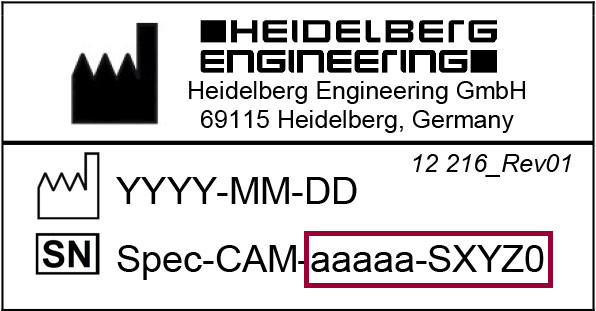
The camera’s serial number of your SPECTRALIS is at the bottom of the camera. The camera’s serial number is a ten digit number marked with the [SN] symbol.
Get new perspectives with the Heidelberg Engineering Account. Sign up to access exclusive resources and insights.
To make sure you don't miss any news, sign up for our newsletter!
We are committed to providing quick, reliable solutions that support your work and help enable high-quality patient care and research.
Below please find the most frequently asked questions about our devices and services. If you do not find the answer to your particular question, please contact our Service & Support team for assistance.
This is to inform you that the following products or components have been discontinued. You can continue to get support until the product has reached its End-of-Service status - this includes any updates, critical bug fixes, repairs or technical measures required to support the functioning of the device. After this period, Heidelberg Engineering GmbH aims to provide Best Effort Support for as long as the expected product service life is still valid and spare parts and/or tools are available. However, please note that this cannot be guaranteed and may vary from country to country.
The camera’s serial number of your SPECTRALIS is at the bottom of the camera. The camera’s serial number is a ten digit number marked with the [SN] symbol.

The camera’s serial number of your HRA2 is at the bottom of the camera. The camera’s serial number is a five digit number following “Serial No: HRA2-“.
The serial number of your HEP is in the housing. Open the housing cover. The Heidelberg Engineering label looks different for old and new devices. The serial number is always a five digit number marked either with the [SN] symbol or with S/N.
The serial number of your HRT3 is in the housing. Open the housing cover. The serial number is a five digit number marked with the [SN] symbol.
Please note that labels on older devices may differ from the above examples.
This is to inform you that the following products or components have been discontinued. You can continue to get support until the product has reached its End-of-Service status - this includes any updates, critical bug fixes, repairs or technical measures required to support the functioning of the device. After this period, Heidelberg Engineering GmbH aims to provide Best Effort Support for as long as the expected product service life is still valid and spare parts and/or tools are available. However, please note that this cannot be guaranteed and may vary from country to country.
You can find PC requirements for all Heidelberg Engineering devices and network requirements in the Heidelberg Eye Explorer Networking and Administrator Guide.
The optical and non-optical surfaces of your objective lens need special treatment. For detailed information on cleaning and disinfecting objective lenses, please refer to the following documents:
To disinfect optical surfaces of your objective lens, follow the instructions below:
To clean optical surfaces of your objective lens, follow the instructions below:
To clean non-optical surfaces of your objective lens, follow the instructions below:
Any standard cleaning product appropriate for plastic and metal surfaces which does not contain acetone or hydrogen peroxide may be used.
If you cannot open the acquisition window, perform the following steps:
This is to inform you that the following products or components have been discontinued. You can continue to get support until the product has reached its End-of-Service status - this includes any updates, critical bug fixes, repairs or technical measures required to support the functioning of the device. After this period, Heidelberg Engineering GmbH aims to provide Best Effort Support for as long as the expected product service life is still valid and spare parts and/or tools are available. However, please note that this cannot be guaranteed and may vary from country to country.
If the wrong patient was selected for image acquisition and the patient’s images are stored in the wrong patient file, you can move examinations into the correct patient file later on. For detailed information on moving images from one patient file into another and on the “Change Patient“ function, please refer to your device manual.
If you use different Heidelberg Engineering devices with separate databases, you can export copies of patient files from one database and import them into another database. For further information on importing and exporting E2E files, please refer to your device manual.

Example: H2E-1234-010-005
The difference between the total number of purchased licenses and the number of fixed licenses is the number of floating licenses.
This section describes how to proceed in case of HEYEX version 1.6.1.0 and higher:

Heidelberg Engineering recommends to make backups on daily basis.
If the dongle of Heidelberg Eye Explorer License Manager (HELIC) cannot be detected, follow the instructions below:
If the dongle of Heidelberg Eye Explorer License Manager (HELIC) does not launch, follow the instructions below:
If the database path added in the “heyex.ini“ file is not licensed by Heidelberg Eye Explorer License Manager (HELIC), follow the instructions below:
For further information on Heidelberg Eye Explorer License Manager, please refer to Heidelberg Eye Explorer Networking and Administrator Manual.
This is to inform you that the following products or components have been discontinued. You can continue to get support until the product has reached its End-of-Service status - this includes any updates, critical bug fixes, repairs or technical measures required to support the functioning of the device. After this period, Heidelberg Engineering GmbH aims to provide Best Effort Support for as long as the expected product service life is still valid and spare parts and/or tools are available. However, please note that this cannot be guaranteed and may vary from country to country.
Yes, all Heidelberg Engineering instruments can be networked, including SPECTRALIS and HRT instruments. All instruments run on the HEYEX (Heidelberg Eye Explorer) software, which is designed to operate in a networked environment.
HEYEX is the acronym for Heidelberg Eye Explorer. It is the operating software for all Heidelberg Engineering instruments. HEYEX also manages all patient data and images.
The HEYEX platform provides the fundamental components for an optimal practice workflow:
HEYEX uses the central data management concept in which patient data and images from multiple instruments can be stored and managed in a single database. This eliminates the creation of duplicate patient records across multiple instruments. Central data management is also the key technology for remote image review, allowing you to review and modify images at your instrument(s) and from networked PCs in your department.
You can review images from a networked PC in your department, for example in the doctor’s office or the exam lanes*. You have full access to HEYEX and all patient images, along with the tools for a fully dynamic image review.
*Requires HEYEX Network License(s) and network configuration according to specified recommendations.
Dynamic image review is the ability to manipulate images, rather than just viewing them. Since the software and review tools on the HEYEX viewing stations are identical to those on the instrument, you have full access to tools like 3D image display, report creation, measurements, scan planning and more.
You can configure as many viewing stations as your network can support. Please see the Hardware and Network Guide for HEYEX Viewing Stations for information on hardware and networking requirements.
SPECTRALIS instruments typically include two (2) viewing licenses with purchase, referred to as HEYEX Network Licenses. Because HEYEX Network Licenses are floating licenses, the number of licenses you need equals the maximum number of users who will review images simultaneously.
Floating licenses are licenses that can be shared among multiple users. Therefore, it is not necessary to purchase a license for every viewing PC or user in your department. Instead, the number of licenses you need equals the maximum number of users who will review images simultaneously.
You do not need to purchase the viewing station hardware from Heidelberg Engineering. We provide hardware and network requirements for viewing stations to ensure optimal viewing performance. Many customers find that they can use their existing PCs as viewing stations. For more information, please see the Hardware and Network Guide for HEYEX Viewing Stations.
No. You can use the PC that is utilized in your practice to review images. However, the PC should meet our minimum hardware requirements.
Our Hardware and Network Guide for HEYEX Viewing Stations is available here.
Yes. You can add images from third-party instruments to the patient record in HEYEX, by using the HEYEX Image Capture Module. The Image Capture Module is included with each SPECTRALIS instrument.
The HEYEX Image Capture Module is a tool that allows you to import standard image files (e.g. jpg, bmp, png, tiff) into your HEYEX patient record, for example images from other instruments, notes and photographs. The Image Capture Module is included with the SPECTRALIS instrument.
Yes. Heidelberg Engineering instruments can be networked together to share a database. This allows you to store a patient’s exams from different instruments in the same, central patient record and review all exams at once.
Heidelberg Engineering instruments can be interfaced to EHR (electronic health record) and IMS (image management system). Depending on the capabilities of your EHR or IMS, the interface may provide the following capabilities:
Note: Not all EHR and IMS systems provide instrument interfaces
Heidelberg Engineering instruments can interface with a variety of electronic health records (EHR) and image management systems (IMS). Examples are ifa, NextGen, Forum, EyeRoute, Synergy and others. Interfaces are available via the DICOM standard or in proprietary format. You can find an overview of compatible EHR and IMS here. Please check back regularly for updates.
All instruments in the SPECTRALIS family are DICOM-compatible, allowing the interface with EHR, IMS, and PACS (Picture Archiving and Communication System).
DICOM stands for Digital Imaging and Communication in Medicine. It is an industry standard for medical imaging management, which has beendeveloped to enable systems and instruments to interface with one another, independent of the manufacturer. Offering DICOM-compatible systems and instruments eliminates the need for proprietary interfaces which require custom development and support. Although the implementation of the DICOM standard is optional for system and instrument manufacturers, many large institutions now require new equipment to be DICOM-compatible.
DICOM is all about enhancing and optimizing clinical workflow. One important function is the exchange and synchronization of patient information and orders between information systems and instruments.
The benefit is the elimination of data entry into multiple systems, and the access to the most up-to-date patient information on your instruments. Another important function is the export of images, reports and related information to a PACS or image management system. Such systems allow the storage of images from all the instruments in your department in a single application for easy image review.

